Object References
Some components are supposed to work with other objects, but those objects are not in their hierarchy as a parent or child node, but may instead be any arbitrary object that the user wants to select. Such use cases are supported through object references, meaning that a component can have properties that store a reference to another object (within the same scene or prefab document).
A very basic example is the DrawLineToObject component (from the plasma.gamecomponents package), which literally just draws a line between itself and a referenced object. In the engine itself, the camera's FocusObject is an object reference.
Object Reference UI
In the editor UI an object reference property looks like this:

The field shows the name of the referenced object. Clicking the pick button (Pick object in viewport) switches to object selection mode: click any object in the 3D viewport, or select it in the Scene Tree, to make it the referenced object. Click the button again to cancel.
The row's … menu (Property actions, shown when you hover over the row) has more options:
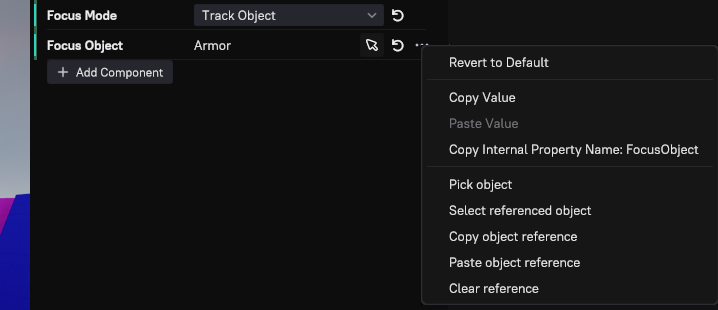
Select referenced object selects the object the property points to. You can also right click any object in the Scene Tree or in the viewport and choose Copy Object Reference, then use Paste object reference in this menu to set the reference. This is sometimes easier than clicking on an object in the viewport. Clear reference empties the property.
Object References in Custom Components
When you create a custom component you may want to have an object reference property. The easiest way to achieve this, is to get inspiration from existing code, such as plLineToComponent.
Object references are a 'non-trivial' (complicated) feature. They need to be remapped within instances of prefabs, they work differently in the editor and the runtime, and it is possible to use them as exposed parameters. Consequently, you have to stick to a certain pattern to make them work.
Expose them as a string property and use custom functions as accessors. Also decorate them with plGameObjectReferenceAttribute:
PL_ACCESSOR_PROPERTY("Target", GetLineToTargetGuid, SetLineToTargetGuid)->AddAttributes(new plGameObjectReferenceAttribute()),
The 'getter' accessor function is actually never called, but since PL_ACCESSOR_PROPERTY expects a valid function, you need to have at least one dummy function that you can pass in. In your 'setter' function you need to query a 'reference resolver' from the world and use that to map the string to an actual game object handle. Here you also need to pass in information about the component and the property. This is mainly needed by the editor to handle undo/redo correctly.
void plLineToComponent::SetLineToTargetGuid(const char* szTargetGuid)
{
  auto resolver = GetWorld()->GetGameObjectReferenceResolver();

  if (resolver.IsValid())
  {
    // tell the resolver our component handle and the name of the property for the object reference
    m_hTargetObject = resolver(szTargetGuid, GetHandle(), "Target");
  }
}

const char* plLineToComponent::GetLineToTargetGuid() const
{
  // this function is never called
  return nullptr;
}
Finally, during component serialization you just use plWorldWriter::WriteGameObjectHandle() and plWorldReader::ReadGameObjectHandle() to save and restore the actual game object handle.
Limitations
Object references are not possible across scene layers.