Contact Shadows
Contact shadows add the fine shadow detail that shadow maps miss: the dark line where a crate meets the floor, the shadow under a character's feet and fingers, small props on a table. For each light that gets one, a short ray is traced in screen space from every pixel toward the light through the depth buffer, and the result is multiplied into that light's shadow.
The sun and the most important local lights each get a contact shadow. In 0.12 contact shadows replace the earlier screen-space shadow pass, which only worked for the sun.
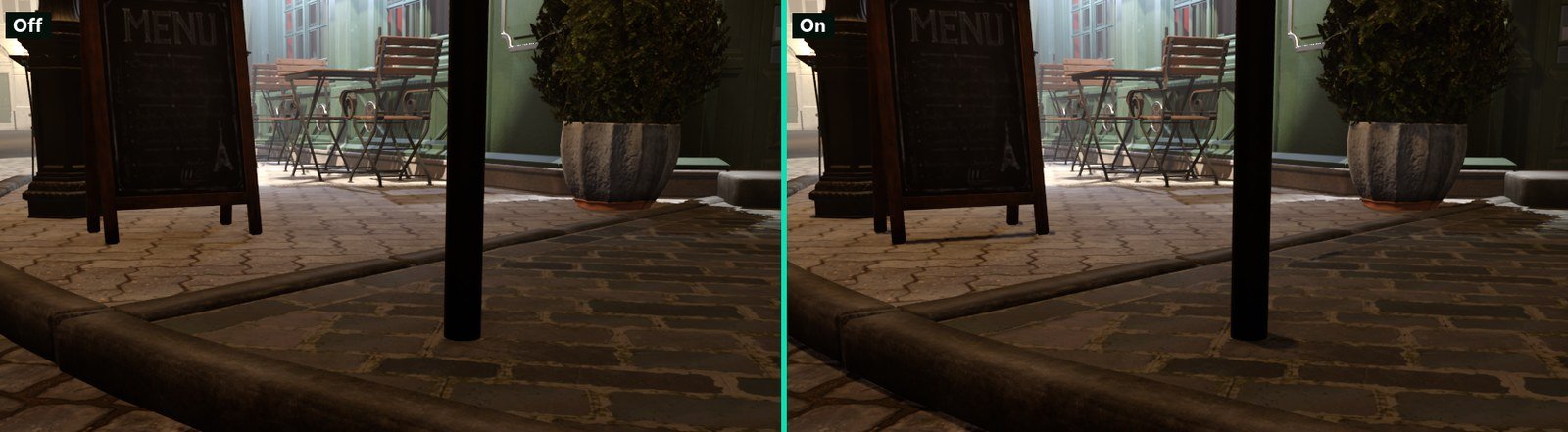
Bistro sample, High preset settings (4 local-light slots, quality 1). The difference is at the contact points: sign feet, bollard base, chair legs and the kerb.
Concepts
Slots. Every light with ContactShadows on asks for a slot. The brightest directional light (the sun) always gets one. Local lights (point, spot and area lights) compete for the remaining slots, ranked by how much of the screen they cover and how bright they are; lights far from the camera fade out of the ranking. Slots are sticky, so a light does not flicker in and out when two lights score almost the same. The number of local-light slots comes from the quality preset (see Quality). Fill lights never get a slot.
Independent of shadow maps. Contact shadows work on lights with and without CastShadows, so a light without a shadow map can still ground the objects near it.
Ray-traced lights are skipped. Lights that ReSTIR or guided direct lighting already traces get no slot, because their rays resolve contact on their own. The sun is skipped when ReSTIR direct lighting traces it.
Softening. At contact shadow quality 1 and 2 (the High and Max presets), the shadow widens with the distance to the occluder and the size of the light (the light's PenumbraSize), so it is hard where an object touches the ground and softer further away. These levels also jitter the rays and accumulate them over several frames.
Limits. Contact shadows only see what is on screen and in the depth buffer, and they assume a thickness for each surface. They add detail close to the receiver; they do not replace shadow maps over longer distances. Transparent surfaces do not cast them.
Setting up contact shadows
- Select a light. New lights have
ContactShadowson. Check lights in scenes from before 0.12, which may have it off. - In the Shadows group, turn on
ContactShadowsand setContactShadowLength: about 0.3 m for props and characters, up to 1 m or more for large objects under a low sun. - If the shadow edge is too hard or too soft, adjust the light's
PenumbraSize. It is shown whileCastShadowsorContactShadowsis on. - Use the stats
Renderer/ContactShadows/SlotsandRenderer/ContactShadows/Candidatesto see how many lights asked for a slot and how many got one.
Light component properties
These properties are in the Shadows group of every light type except fill lights. See Dynamic Shadows for the other shadow properties.
| Property | Default | Description |
|---|---|---|
ContactShadows | On | Traces a short screen-space shadow toward the light. Works with or without CastShadows. |
ContactShadowLength | 0.3 m | World-space length of the trace, 0.02 to 2 m. Hidden while ContactShadows is off. |
PenumbraSize | 0.05 m | Size of the light source. Also sets how much the contact shadow softens with distance. |
Quality
| Preset | Rendering.ContactShadows.LocalLights | Rendering.ContactShadows.Quality |
|---|---|---|
| Low (and mobile) | 0 (sun only) | 0: hard, 20 steps |
| Medium | 2 | 0: hard, 20 steps |
| High | 4 | 1: softened and accumulated over frames, 28 steps |
| Max | 8 | 2: softened and accumulated, 40 steps and longer rays |
The Quality Settings panel shows these in the Shadows group as Contact shadows, Contact shadow lights and Contact shadow quality.
Console variables
| CVar | Default | Description |
|---|---|---|
Rendering.ContactShadows.Enable | true | Global switch. |
Rendering.ContactShadows.LocalLights | 4 | Local-light slots next to the sun, 0 to 8. Set by the quality presets. |
Rendering.ContactShadows.Quality | 1 | 0 = hard, 1 = softened with temporal accumulation, 2 = softened, temporal, longer rays. Set by the quality presets. |
Rendering.ContactShadows.Temporal | true | Jitters the rays and accumulates them over frames (quality 1 and 2). |
Rendering.ContactShadows.Async | true | Runs the trace on the async compute queue when Rendering.AsyncQueues is on. |
Rendering.Debug.ContactShadows.SunOnly | false | Debug: only the sun gets a slot. |
Rendering.Debug.ContactShadows.NoHysteresis | false | Debug: slots follow the instantaneous ranking, with no stickiness. |
Stats: Renderer/ContactShadows/Candidates (lights that asked for a slot), Renderer/ContactShadows/Slots (lights traced this frame), Renderer/ContactShadows/SkippedRayTraced (lights left to ray-traced lighting) and Renderer/ContactShadows/Sun (1 when the sun has a slot).
Troubleshooting
| Symptom | Cause and fix |
|---|---|
| A light has no contact shadow | It has ContactShadows off, it lost the ranking for a slot (raise the preset or Rendering.ContactShadows.LocalLights), it is a fill light, or ReSTIR / guided direct lighting traces it. |
| Only the sun has contact shadows | The Low and mobile presets give local lights no slots. |
| The shadow stops short of the object | Raise ContactShadowLength. |
| The shadow disappears at the screen edge | The occluder is off screen; this is a screen-space limit. |
| The shadow edge shimmers when the camera moves | On quality 1 and 2 the rays are accumulated over frames; keep Rendering.ContactShadows.Temporal on. |
| Transparent objects cast no contact shadow | By design: transparent objects are not in the depth buffer the trace reads. |