Depth of Field
Depth of field blurs what is in front of and behind the distance the lens is focused at. The blur comes from the camera component's physical lens: aperture (f-stop), focal length, sensor size and focus distance. A long lens at f/1.4 focused at 2 m melts the background, while the same scene at f/8 stays sharp almost everywhere. Bright out-of-focus highlights take the shape of the aperture, so a lens with seven blades draws seven-sided bokeh.
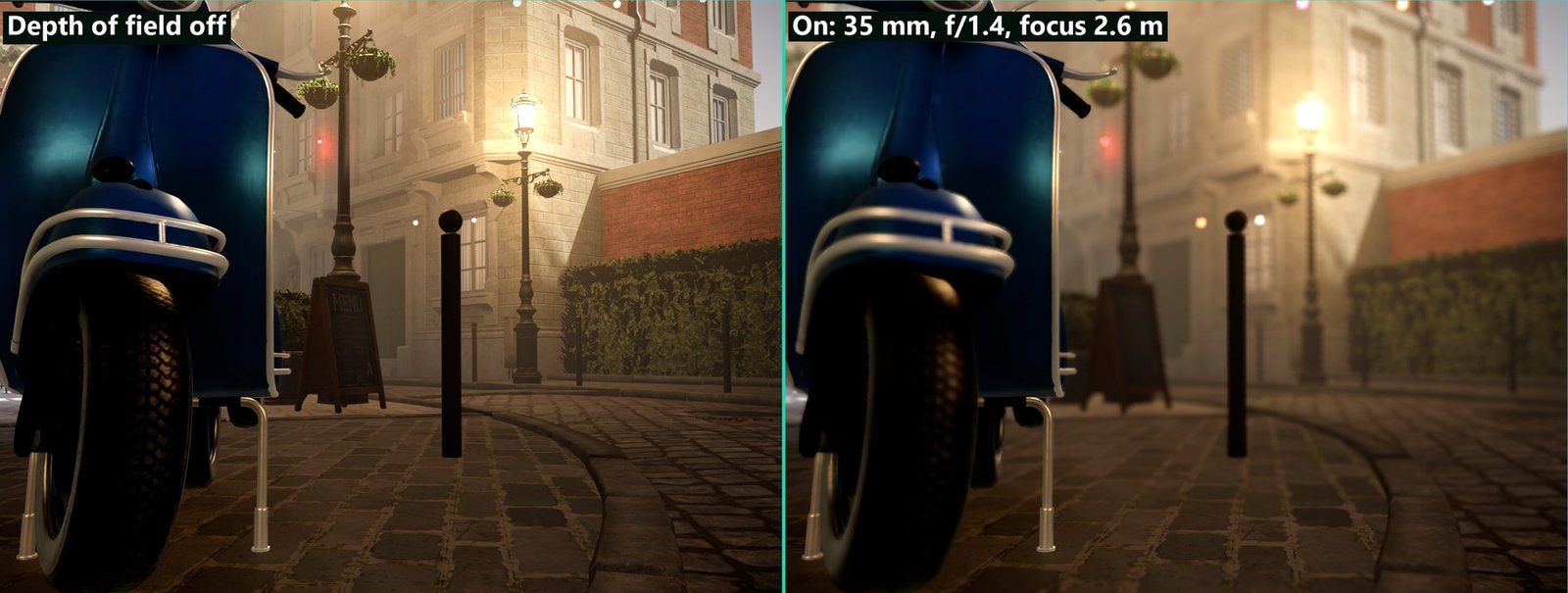
Bistro sample, Play mode through the scene camera: Focal Length 35 mm, Aperture f/1.4, Manual focus at 2.6 m.
Concepts
Circle of confusion. Every out-of-focus point spreads into a disc on the sensor. The renderer computes the radius of that disc per pixel with the thin-lens formula and blurs by it. A larger aperture (smaller f-number), a longer focal length and a closer focus distance all make the disc bigger.
Near and far field. Blur in front of the focus distance (near field) spreads over sharp objects behind it, the way a blurry foreground branch veils the subject. Blur behind the focus distance (far field) stays behind sharp objects. The two layers are gathered separately and combined at the end, so in-focus edges get no halo.
Focus. The camera chooses its focus distance with FocusMode:
| Focus mode | Focus distance comes from |
|---|---|
| Auto | The scene at the centre of the view, measured every frame on the GPU and eased over FocusSpeed. |
| Manual | FocusDistance, in metres. A distance of 0 behaves like Auto. |
| Track Object | The depth of FocusObject along the view direction. |
Where it runs. On the HDR image after temporal anti-aliasing, before motion blur and bloom. The editor render pipeline uses the same order as the main pipeline. Game UI draws later and stays sharp. Transparent surfaces blur by the opaque depth behind them.
Setting up depth of field on a camera
- Select the object with the camera component. New cameras have
DepthOfFieldon. Cameras from scenes saved before 0.12 have it off, so turn it on in the Depth of Field group. - In the Lens group, set
FovModeto Focal Length and pick aFocalLengthandSensorPreset. Longer lenses and larger sensors blur more. - Set
Aperture. f/1.4 to f/2.8 gives a strong blur, f/8 and above very little. In Physical exposure mode the aperture also changes the exposure, so useBokehScalewhen you want more or less blur without changing the brightness. - Choose a
FocusMode. For Track Object, setFocusObject; for Manual, setFocusDistance. - In the Depth of Field group, shape the bokeh:
ApertureBlades0 for round discs or 5 to 11 for polygons, thenBladeCurvatureandApertureRotation. UseAnamorphicSqueezefor anamorphic lenses andOpticalVignettingfor cat's-eye bokeh toward the frame edge. ABokehShapetexture replaces the blades with any shape. - Check the result with the Depth of Field render modes (see Render modes).
Depth of field needs a camera component to drive the view: in Play, Play in Viewport and the Player, the main camera's lens is used. The free-flying editor camera has no lens and stays sharp, but the depth of field render modes still work in it.
Depth of field is skipped for orthographic cameras and for stereo (XR) views.
Camera component properties
The Lens group holds the physical lens; the Depth of Field group switches the effect and shapes the bokeh. The inspector hides properties that do not apply: the bokeh settings while DepthOfField is off, BladeCurvature with fewer than 3 blades, the blade settings while a BokehShape is set, and FocusArea and FocusSpeed unless the camera auto focuses.
Lens group
| Property | Default | Description |
|---|---|---|
FocalLength | 50 mm | Lens focal length, 4 to 1200 mm. Used when FovMode is Focal Length. |
SensorPreset | Full Frame | Full Frame (36 × 24 mm), Super 35 (24.89 × 18.66 mm), APSC (23.6 × 15.6 mm), Micro Four Thirds (17.3 × 13 mm) or Custom. |
SensorWidth, SensorHeight | 36 mm, 24 mm | Sensor size for the Custom preset. |
GateFit | Horizontal | Which sensor axis fixes the field of view when the image aspect differs from the sensor's. |
Aperture | f/8 | f-number, 1 to 32. Sets the amount of blur. In Physical exposure mode it also sets the exposure. |
FocusMode | Auto | Auto, Manual or Track Object (see Concepts). |
FocusDistance | 0 m | Focus distance in Manual mode. 0 auto focuses. |
FocusObject | none | Object kept in focus in Track Object mode. |
FocusArea | 5 % | Auto focus: size of the measured area at the centre of the view, as a percentage of the frame height (1 to 30 %). |
FocusSpeed | 0.25 s | Auto focus: time constant of the focus movement, 0 to 5 s. 0 refocuses instantly. |
Depth of Field group
| Property | Default | Description |
|---|---|---|
DepthOfField | On (new cameras) | Blurs what is out of focus. Hidden for orthographic cameras. |
ApertureBlades | 0 | 0 = round aperture; 3 to 16 = polygonal bokeh with that many sides. |
BladeCurvature | 0.5 | 0 = straight blades, 1 = round. |
ApertureRotation | 0° | Rotation of the aperture polygon or of the BokehShape texture. |
AnamorphicSqueeze | 1 | Horizontal squeeze of the bokeh, 1 to 2. Use 1.33 to 2 for anamorphic lenses. |
OpticalVignetting | 0.3 | How much the bokeh is clipped into cat's eyes toward the frame edge, 0 to 1. |
BokehScale | 1 | Multiplies the physical blur radius, 0.25 to 4, without changing the f-stop or the exposure. |
BokehShape | none | A 2D texture that replaces the aperture shape. White lets light through. |
Post Process Volume settings
A Post Process Volume can limit the blur for an area or for the whole scene. Turn on OverrideDepthOfField in its Depth Of Field group.
| Property | Default | Description |
|---|---|---|
OverrideDepthOfField | Off | Applies the settings below while the volume affects the camera. |
DepthOfFieldMaxBlur | 3 % | Largest blur radius as a percentage of the frame width, 0 to 10 %. Clamps very shallow focus. 0 turns depth of field off. |
DepthOfFieldNearField | On | Off keeps everything in front of the focus distance sharp. |
Before 0.12 the volume set the blur with a DepthOfFieldRadius value. That setting was removed and is dropped when older volumes load: the amount of blur now comes from the camera's lens.
Quality
The quality preset decides how many samples the gather uses and which lens features are drawn. The Quality Settings panel shows it as Depth of field in the Camera effects group.
Rendering.DepthOfField.Quality | Preset | Gather |
|---|---|---|
| 0 | Low (and the mobile preset) | 19 samples, round bokeh only, no near-field coverage or fill. Blades, BokehShape, squeeze and vignetting are ignored. |
| 1 | Medium | 37 samples, shaped bokeh. AnamorphicSqueeze and OpticalVignetting are ignored. |
| 2 | High | 61 samples, all lens features. |
| 3 | Max | 91 samples, all lens features. |
Console variables
| CVar | Default | Description |
|---|---|---|
Rendering.DepthOfField.Enable | true | Global switch. Off keeps every view sharp. Cameras still choose whether they use it. Shown as Depth of field allowed in the Quality Settings panel. |
Rendering.DepthOfField.Quality | 1 | Gather quality, 0 to 3 (see Quality). Set by the quality presets. |
Rendering.DepthOfField.MaxBlur | 3 | Largest blur radius in percent of the frame width. Written by post process volumes. |
Rendering.DepthOfField.NearField | true | Foreground blur spreads over what is behind it. Written by post process volumes. |
Rendering.Debug.DepthOfField.View | 0 | Draws a diagnostic in every view: 1 circle of confusion, 2 focus plane, 3 tiles. |
Rendering.Debug.DepthOfField.FreezeFocus | false | Keeps the last measured auto focus distance. |
Render modes
The viewport's render mode menu has a Depth of Field submenu. These modes run the effect even when the camera's DepthOfField is off, so you can inspect the blur before enabling it.
| Render mode | Shows |
|---|---|
| Depth Of Field Circle Of Confusion | Blue in front of the focus distance, green in focus, orange behind it. Brighter means more blur. |
| Depth Of Field Focus Plane | What is in focus in green over a grey image, with the exact focus distance drawn in white. |
| Depth Of Field Tiles | The work per screen tile: grey tiles are skipped, yellow tiles use a cheap gather, magenta tiles use the full gather. |
Troubleshooting
| Symptom | Cause and fix |
|---|---|
| No blur at all | The camera's DepthOfField is off (cameras from older scenes), the camera is orthographic, the view is stereo (XR), Rendering.DepthOfField.Enable is off, or a post process volume sets DepthOfFieldMaxBlur to 0. In the editor, the free camera has no lens; use Play in Viewport. |
| Everything is blurred | The focus distance is wrong. Check the Depth Of Field Focus Plane render mode. With Auto focus, the centre of the view may be on the sky or a distant wall. |
| The blur is too strong at f/1.4 | Lower BokehScale on the camera or DepthOfFieldMaxBlur in a post process volume, or use a shorter focal length. |
| Auto focus pumps | Raise FocusSpeed, or enlarge FocusArea so a single object crossing the centre does not decide alone. |
| Bokeh is round although blades are set | The Low quality preset draws round bokeh only. |
| Transparent objects look sharp in a blurred area | They blur by the opaque depth behind them; this is a known limitation. |