Film Grain
Film grain adds a fine, changing noise to the final image, like the grain of photographic film. It is applied by the tonemapper after tonemapping, in display space, so it looks the same at any exposure. It is strongest in the midtones and fades in deep shadows and highlights. With HDR output the grain has the same perceptual size as in SDR.
Film grain is off by default. A scene opts in with a Post Process Volume, or a project turns it on with the Rendering.FilmGrain.Enable cvar. Unlike motion blur, film grain also shows in editor views. Render modes and asset thumbnails never get grain.
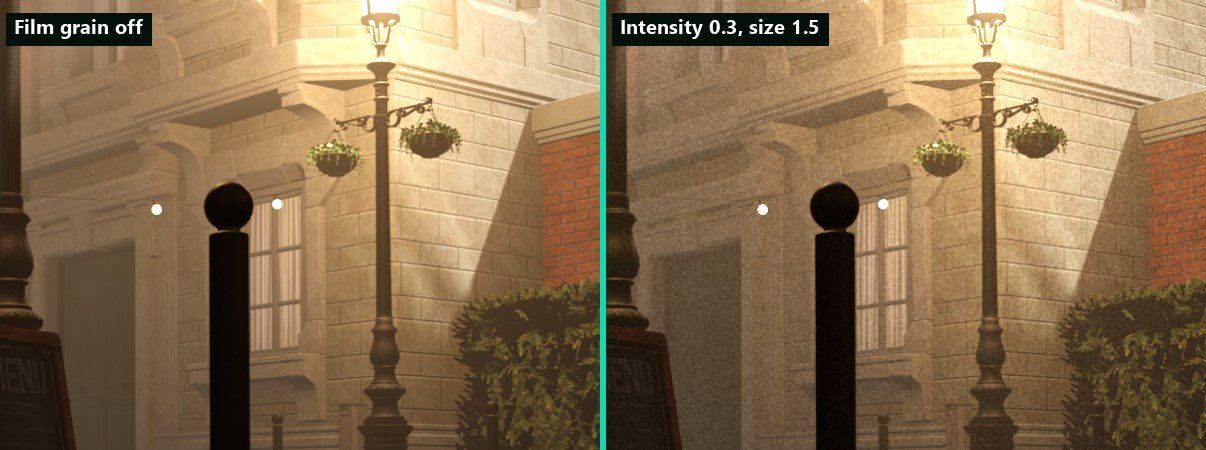
Bistro sample, 100% crop. Global Post Process Volume with OverrideFilmGrain, Intensity 0.3, Size 1.5.
Turning on film grain for a scene
- Add a Post Process Volume component to an object in the scene, or select an existing one.
- In its Film Grain group, turn on
OverrideFilmGrain.FilmGrainEnabledis on by default. - Adjust
FilmGrainIntensityandFilmGrainSize. RaiseFilmGrainChromafor coloured grain.
Post Process Volume settings
| Property | Default | Description |
|---|---|---|
OverrideFilmGrain | Off | Applies the settings below while the volume affects the camera. |
FilmGrainEnabled | On | Turns film grain on or off inside the volume. |
FilmGrainIntensity | 0.15 | Grain amplitude in the midtones, 0 to 1. |
FilmGrainSize | 1.5 px | Grain size in pixels, 1 to 4. |
FilmGrainResponse | 0.8 | How much the grain fades in deep shadows and highlights: 0 = even everywhere, 1 = only in the midtones. |
FilmGrainChroma | 0 | Colour of the grain: 0 = monochrome, 1 = independent per channel. |
Player setting
Players can turn film grain off with Film grain (Accessibility.FilmGrain, default on) in the Accessibility section of the game settings. It is written to the Accessibility.FilmGrain.Scale cvar, which volumes never change; 0 turns grain off whatever the scene asks for.
Console variables
| CVar | Default | Description |
|---|---|---|
Rendering.FilmGrain.Enable | false | Master switch. Written by post process volumes. Shown as Film grain in the Camera effects group of the Quality Settings panel. |
Rendering.FilmGrain.Intensity | 0.15 | Grain amplitude in the midtones, 0 to 1. |
Rendering.FilmGrain.Size | 1.5 | Grain size in pixels, 1 to 4. |
Rendering.FilmGrain.Response | 0.8 | Fade in shadows and highlights, 0 to 1. |
Rendering.FilmGrain.Chroma | 0 | 0 = monochrome, 1 = independent per channel. |
Accessibility.FilmGrain.Scale | 1 | Player setting. 0 turns film grain off. |
Output dither
Separate from film grain, the tonemapper dithers SDR output once, with zero-mean noise sized to the precision of the output target, to hide colour banding in gradients such as skies. Since 0.12 this is the only output dither: earlier versions also dithered scene colour in the lighting passes, so the image was dithered twice with a small bias. Turn it off with Rendering.Tonemap.Dither to see the banding it hides.