Sky Light Component
The sky light component (plSkyLightComponent) lights the whole scene with the sky. It provides two things:
- Diffuse sky light from six directions (an ambient cube), so surfaces facing the blue sky turn bluish and surfaces facing the ground get the ground's colour. The ambient light component only has two fixed colours.
- The fallback reflection: a cubemap that every surface reflects where no local reflection probe covers it.
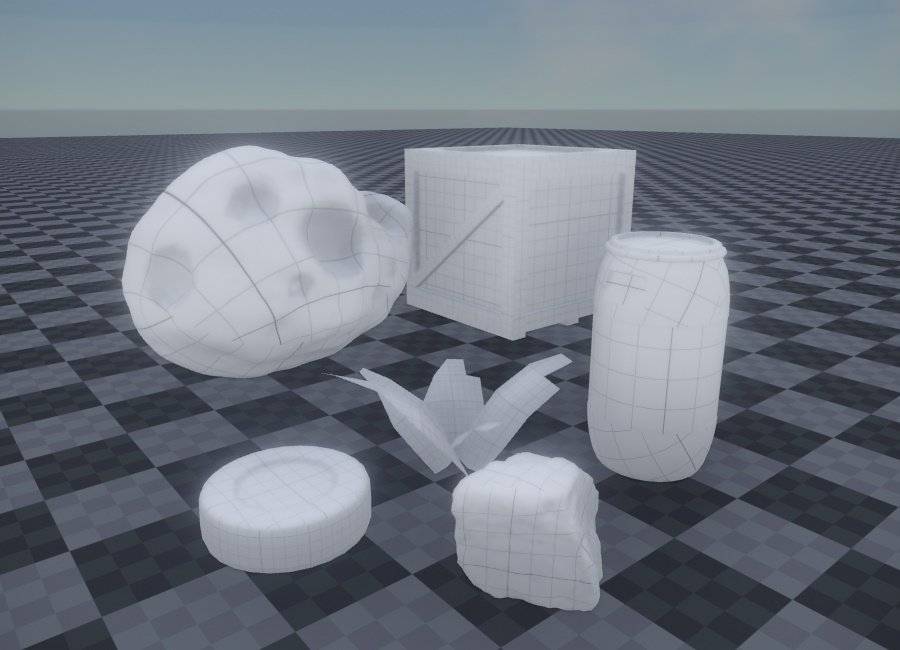
The image above shows objects lit only by a sky light under a sky box with a blue sky, which gives them a slightly blue tint.
The sky light is a scene-wide setting: a scene uses one, and it replaces the ambient light component's contribution.
Where the sky comes from
ReflectionProbeMode selects the source:
- Dynamic captures the scene around the sky light continuously, in the scene's units. Use it with a Sky Atmosphere, a sky box or a time-of-day setup: the lighting follows every change. Nothing needs calibrating.
- Static captures the scene once at the start (and when its settings change), or, with a
CubeMap, filters that cubemap instead of capturing anything. A cubemap is scaled by theCalibration, which works like the sky box's: give the sky light the sky box's cubemap and calibration, and it casts the light of the sky the sky box shows.
Scene setup
The sky light only captures objects that carry one of its IncludeTags, by default the tag SkyLight. Typically that is the sky (sky box or Sky Atmosphere object), maybe the ground, and distant scenery that the player never reaches, such as mountains or a city backdrop. Tag those objects with SkyLight; everything else is left out, so the sky light does not capture the level itself.
A new sky light replaces the existing ambient lighting. If nothing in the scene has the SkyLight tag yet, the capture is empty and the scene turns black. Add the tag to your sky.
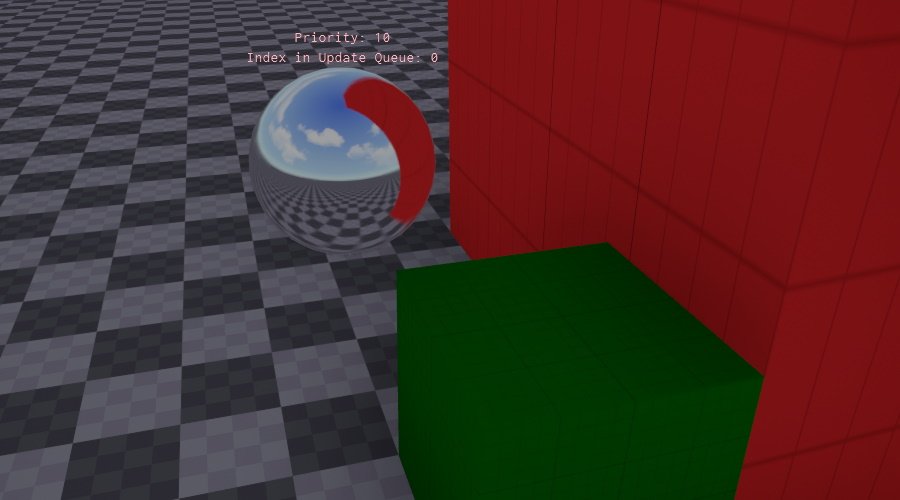
Turn on ShowDebugInfo to see what the sky light captured: a sphere at its position shows the captured sky. In the image below the sky box, the floor and the red object are tagged SkyLight and appear in the preview; the green box is not tagged and does not. ShowMipMaps adds a stack of spheres above it with the reflection at increasing roughness.
Sky light vs. ambient light
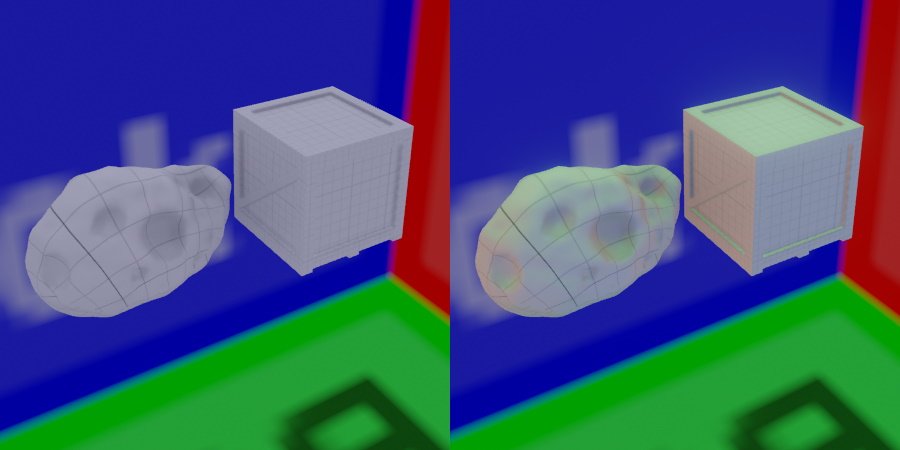
The ambient light component uses fixed colours and is not directional beyond top and bottom. The sky light takes its light from the actual sky and lights from six directions. In the image below the objects on the left are lit by an ambient light and look flat; the objects on the right are lit by a sky light under a sky box with red, green and blue faces.
The ambient light also provides no fallback reflection, so without a sky light you rely on reflection probes for all reflections.
Component Properties
All properties are in the Capture Description group.
| Property | Default | Description |
|---|---|---|
ReflectionProbeMode | Static | Dynamic captures the scene continuously. Static captures once, or uses CubeMap. |
CubeMap | none | A cubemap texture to light the scene with instead of a capture. Static mode only. |
Calibration | ExposureBias | How the cubemap's brightness is scaled. Static mode only. ExposureBias: by 2^ExposureBias. GroundIlluminance: so that the sky's upper half casts CalibrationValue lux on a horizontal surface. ZenithLuminance: so that the sky straight up has CalibrationValue nits. |
ExposureBias | 0 | Stops the cubemap is brightened or darkened by, −32 to 32. Shown with ExposureBias calibration. |
CalibrationValue | 20,000 | The target of the calibration. Its label shows the unit: Ground Illuminance (lux) or Zenith Luminance (nits). 20,000 lux is a clear day, 1000 lux an overcast one. |
DiffuseIntensity | 1 | Scales the diffuse sky light. Keep 1 in a physically lit scene. |
DiffuseSaturation | 1 | Saturation of the diffuse sky light. Below 1 makes it more neutral, for example to reduce a strong blue tint from the sky. |
SpecularIntensity | 1 | Scales the sky reflection. Keep 1 in a physically lit scene. |
IncludeTags, ExcludeTags | SkyLight, none | Which objects the capture renders. The same mechanism as the camera component's tags. |
NearPlane, FarPlane | Auto, 100 m | Clip planes of the capture. Auto derives the near plane from the far plane. |
ShowDebugInfo | Off | Shows a sphere with the captured sky at the sky light's position. |
ShowMipMaps | Off | With ShowDebugInfo, adds spheres showing the reflection at increasing roughness. |
GroundIlluminance and ZenithLuminance need an HDR cubemap transformed with sky metadata (texture usage HDR). Without the metadata the sky light logs a warning and falls back to the exposure bias.
In a physical scene a sky that casts 10,000 lux on the ground makes a white surface in the shade about 3,000 nits. See Physical Light Units.
Existing scenes
Sky lights saved before 0.12 keep their look: DiffuseIntensity loads multiplied by π, the factor by which the old diffuse sky light exceeded the sky it came from. An old default of 0.4 loads as 1.26.
Troubleshooting
| Problem | Cause and fix |
|---|---|
| The scene turned black when the sky light was added. | Nothing has the SkyLight tag. Tag the sky. |
| Shadows are black under a bright sky box. | The sky light is in Static mode with an uncalibrated cubemap. Give it the sky box's Calibration, or use Dynamic mode. |
Raising DiffuseIntensity hardly changes the shadows. | The sky is far darker than the sun, for example a sky box calibrated to a few hundred lux next to a 100,000 lux sun. Calibrate the sky to a daylight value (10,000–20,000 lux) and leave the intensity at 1. |
| The level itself shows in reflections everywhere. | The level's objects have the SkyLight tag. Remove it from everything except the sky and distant scenery. |