Spot Light Component
The spot light component (plSpotLightComponent) adds a light that shines in a cone along the object's local +X axis, like a torch, a headlight, a stage light or a recessed ceiling spot. Within the inner angle the light is equally bright; between the inner and the outer angle it fades to black.
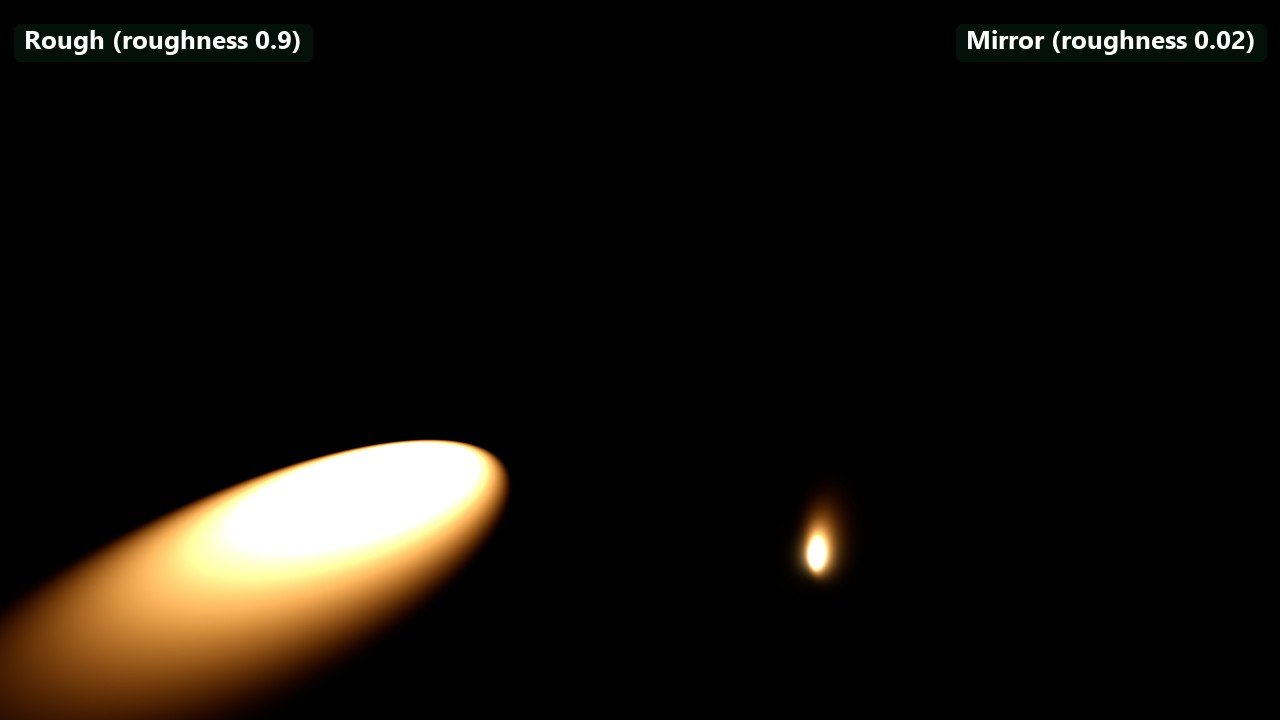
Left: a rough floor (roughness 0.9) shows how the light spreads. Right: a mirror floor (roughness 0.02) shows the light's own shape in its reflection. Two identical lights at default intensity, one over each half, same exposure. Prefer spot lights over point lights whenever the light only needs to reach one side. A ceiling light with a wide cone does not light the floor above, which may make a shadow unnecessary; and when a shadow is needed, a spot light renders one shadow view instead of a point light's six.
A spot light can project a picture: a cookie texture, or a decal material rendered into a texture, colours and masks the light, for example the pattern of a window frame, a gobo or a flickering projector.
Each light costs performance, more so the more of the screen its range covers. Use the light count render mode to find hotspots.
Component Properties
The Color, Shading and Shadows groups and the light header with its Fixture preset button are shared with the other lights; see Light Properties.
| Property | Default | Description |
|---|---|---|
Temperature | 3000 K | Light colour as a colour temperature, when UseColorTemperature is on. |
IntensityUnit | Lumen | Lumen: total output of the lamp. Candela: brightness of the beam. |
Intensity | 800 | Brightness in the selected unit. |
Reflector | On | Only shown in lumens. On, all lumens go into the cone, like a lamp with a reflector: narrowing the cone makes the beam brighter. Off, the cone only masks a bare bulb: the beam keeps its brightness and the light outside the cone is lost. |
Range | Auto | Length of the cone. Auto ends the light where it falls below 0.5 lux (Rendering.Lighting.CutoffIlluminance). See Range and falloff. |
Falloff | 1 | Exponent on the inverse-square distance falloff. 1 is physical. |
InnerSpotAngle | 15° | Full angle of the cone that is lit at full brightness. |
OuterSpotAngle | 30° | Full angle of the cone at which the light reaches zero. Up to 160°. A small difference to the inner angle gives a hard edge, a large difference a soft one. |
ShadowFadeOutRange | Auto | Radius used to decide when the shadow fades out with distance. Auto uses the light's bounds. A larger value keeps the shadow visible from further away. Shown while CastShadows is on. |
Cookie | none | A 2D texture projected through the cone. It tints and masks the light. |
Material | none | A decal material rendered into a texture and projected instead of Cookie, for animated patterns. Overrides Cookie. |
MaterialResolution | 512 | Resolution of the texture the Material is rendered into, 16 to 1024. Shown only with a material. |
MaterialUpdateInterval | 0 s | Seconds between re-renders of the Material, up to 10. 0 re-renders it every frame. Shown only with a material. |
In lumens with Reflector on, the beam's candela is lm / Ω, where Ω is the solid angle of the outer cone: the default 800 lm at 30° gives about 3,740 cd. With Reflector off it is lm / 4π, about 64 cd. The light header shows the beam candela and the illuminance at 2 m. Changing OuterSpotAngle in lumens with a reflector changes the beam brightness, as with a real adjustable spot.
The viewport shows the cone; drag its handles to change the range and both angles.
Troubleshooting
| Problem | Cause and fix |
|---|---|
| The spot gets brighter when the cone narrows. | Reflector is on, as with a real reflector lamp. Turn it off, or switch to Candela to set the beam brightness directly. |
| The cookie does not show. | A Material overrides Cookie. Remove the material, or check that the cookie is a 2D texture. |
| The shadow pops off at a distance. | The light is small on screen. Raise ShadowFadeOutRange. |
| The spot points the wrong way. | Spot lights shine along their object's local +X axis. Rotate the object. |